FleetWatch for LNER
Live LNER departures, and an alarm before your stop.


Reading this on a computer? Point your phone’s camera at the code and it will open FleetWatch on Google Play.
LNER runs the East Coast Main Line between London King’s Cross and Yorkshire, the North East and Scotland.
FleetWatch is an Android app for people who take the same trains most days. It shows live departures for any station in the UK, so LNER trains sit alongside everyone else’s, and it plans the whole trip door to door. It doesn’t sell tickets. It’s for everything that happens after you’ve got one.
Where LNER trains run
Main stations on the network:
- London King’s Cross: onward on the Piccadilly, Victoria, Northern, Circle, Hammersmith & City and Metropolitan lines, at King’s Cross St Pancras.
- Peterborough
- Doncaster
- Leeds
- York
- Darlington
- Newcastle
- Edinburgh Waverley
- Aberdeen
- Inverness
What FleetWatch does on LNER services
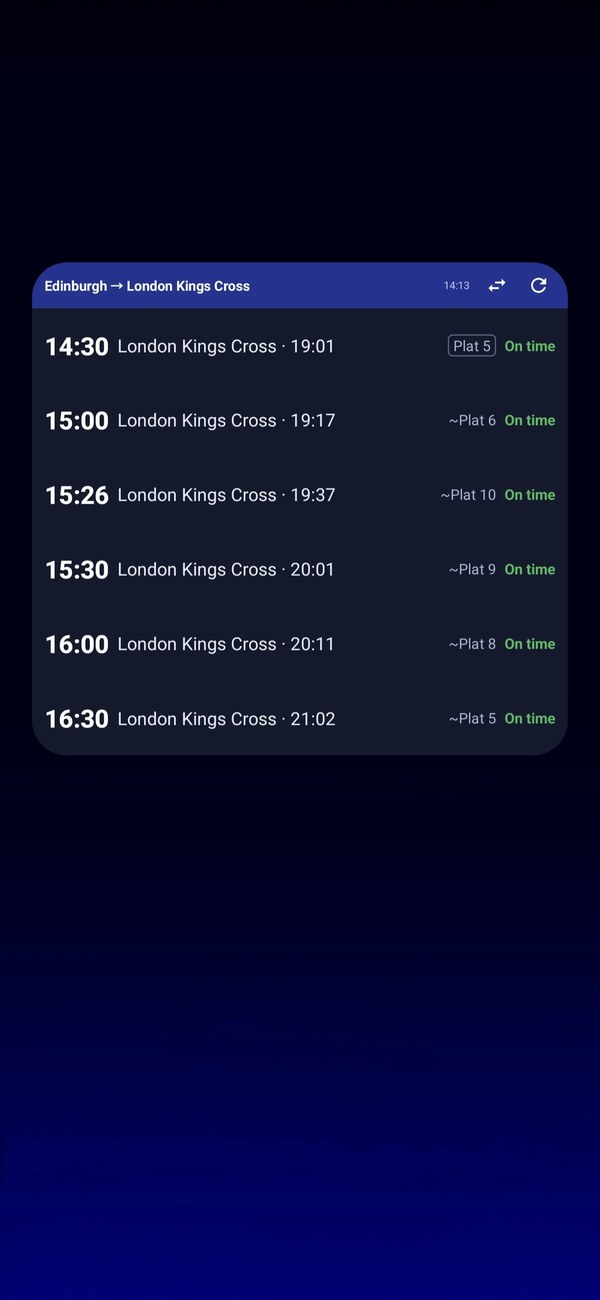
For a regular long-distance trip, the home-screen widget shows your next trains without opening the app, and can turn round for the journey home after midday. Journey alerts tell you about a cancellation, delay or platform change on a train you are watching.
- Live departure boards with platforms, delays and the reason behind them in plain English.
- Door-to-door journeys with a change included, so a two-leg trip reads as one journey rather than two searches, even where the second train is another company’s.
- Board and track. Tell FleetWatch you’re on the train and it follows the service from the live timetable, then sounds an alarm with a vibration before your stop.
- Journey alerts for the trains you watch: a notification when one is cancelled, late or changes platform, even with the app closed.
- Smart Routes suggest a way round a problem on your usual line. Tube connections come from Transport for London, so they exist in London only.
FleetWatch shows the coach layout and how full each coach is where the train company shares it.
Newcastle is a Tyne and Wear Metro interchange, and every Metro station is in the station list, so a trip that carries on from an LNER train to the Metro — out to the coast, to Gateshead or to Newcastle Airport — reads as one journey rather than two searches. Metro times come from the published timetable and show as "Scheduled"; there are no live Metro times, so a late or cancelled Metro will not show, and the alarm, journey alerts, tracking and Delay Repay work on the train legs. Tram and metro networks in other cities, Edinburgh among them, are not part of journey planning for now. Tyne and Wear Metro times: Bus Open Data Service, Department for Transport; contains public sector information licensed under the Open Government Licence v3.0.
Delay Repay on LNER
Delay Repay is run by each train company, so the rules and the claim form are on LNER’s own site: LNER Delay Repay. FleetWatch checks your arrival against the operator’s rules, tells you when a journey qualifies, prepares the details and reminds you before the deadline. The claim itself is yours to send.
Common questions
Does FleetWatch work on LNER trains?
Yes. The live board works for any station in the UK, so LNER trains appear on it like any other. FleetWatch plans journeys door to door, tracks the train you are on and sounds an alarm before your stop.
Is FleetWatch made by LNER?
No. FleetWatch is an independent Android app from The Unknown Dev Ltd. It isn’t affiliated with, endorsed by or sponsored by LNER. Live information comes from National Rail.
Does it cost anything?
It’s free to install. What stays free and what is in the paid plan is set out on the FleetWatch page.
Using a different train company? See them all, or read what FleetWatch does in full.